
Proxies are essential for distributed teams, ensuring privacy, efficient communication and protecting vital data.
Sadly, not all proxies perform as they should. Too often, organizations are hindered by performance issues, particularly latency issues which prevent effective collaboration.
SD-WAN (software-defined wide area networking) combines with proxies to reduce latency. This technology shifts the focus from hardware-focused WANs to a software-based approach, delivering higher levels of performance and an easier network management process.
In short, SD-WAN is essential for organizations that want to reduce latency.
Wondering how you can use this technology to its fullest?
We’ll explore that, and more below.
How Proxies + SD-WAN Reduce Latency
We’ve touched on what SD-WAN is, but how can it help to reduce latency issues? We’ve broken down some of the benefits below.
Optimal Traffic Routing via SD-WAN Path Selection
SD-WAN maximises network availability by flexibly routing traffic across links. It also provides automatic failover, so if a certain connection path underperforms, it switches to a different, more functional alternative.
SD-WAN solutions provide comprehensive network quality metrics. These enable controllers to ensure that traffic is being routed effectively.
Examples of useful metrics include:
- Packet loss – The percentage of packets transmitted over a network that fail to reach their destination
- Latency – The delay between packets being transmitted and reaching their destination
- Jitter – The variation in delay between packets reaching their destination
Proxy Offloading for High-Frequency and Heavy Web Requests
Through proxy offloading, SD-WAN reduces strain on servers, enabling better performance. Here, tasks such as encrypting and decrypting traffic are handled by a separate proxy server.
This server can also hold static resources such as images, videos and JavaScript files. These files build over time and slow server performance.
The proxy server minimizes packet overhead for branch users and frees up the main server. This results in a quicker and smoother user experience.
Using Cloud Proxy PoPs to Shorten Middle-Mile Distance
Cloud proxy points of interest (PoPs) act as “express on-ramps” to the cloud. Modern applications consist of a variety of parts (eg, servers, databases, APIs, etc).
For these components to work correctly, you need a standardized way of accessing them via the client.
Cloud PoPs act as a single service that enables all internal network communication. Through it, traffic avoids congested public internet paths. Content is also cached closer to the user, ensuring faster loading times.
Here’s a simple summary of how PoPs work:
- A request is sent from the client and intercepted by the cloud proxy
- The request is forwarded to a firewall
- The firewall either rejects the request or forwards it to the server
- The server issues a response through the firewall
- The cloud proxy forwards the response to the client

Policy Enforcement Without Slowing Down Traffic
SD-WAN solutions offer a centralized control interface. From here, users have a single point of management for all connections and policies.
Administrators can outline policies to determine the direction of traffic. This ensures that, instead of being routed to a central data centre, traffic is routed efficiently across the network.
Not only does this provide greater control and reduce latency, it also bolsters cybersecurity. Administrators can implement zero-trust identity checks at each stage, ensuring all requests are verified and authorised.
Architecture Example: SD-WAN + Proxy Integrated Flow
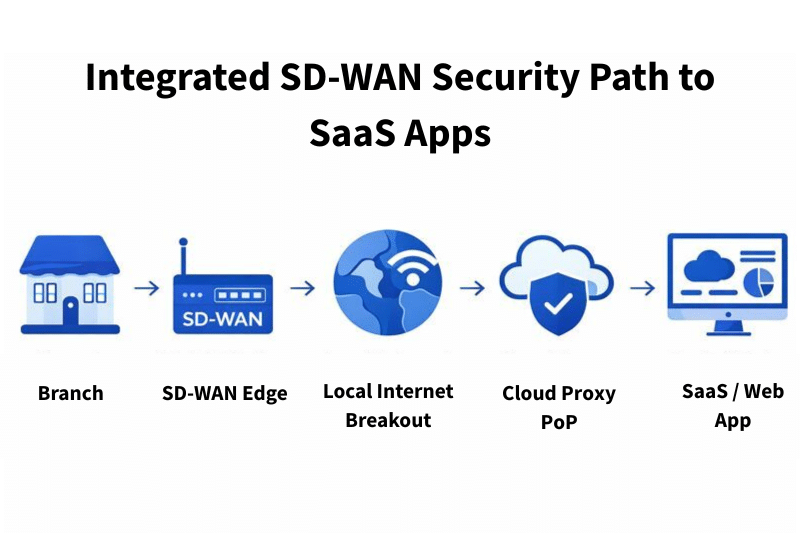
Key notes:
- SD-WAN edge selects path
- Proxy enforces security and reduces latency
- SaaS access becomes more stable globally
Include alternatives:
- On-prem proxy at branch
- Global proxy mesh network
- SSE vendor + SD-WAN integration (e.g., Zscaler, Netskope, Palo Alto)
Real-World Use Cases Where This Combo Reduces Latency
Considering how your organization can benefit from this combination?
Let’s break down some of the real-world use cases of businesses combining proxies with SD WAN.
Remote teams accessing M365, Teams, Zoom
To collaborate effectively, remote employees need continuous access to software, such as Microsoft 365, Teams and Zoom. Organizations combine proxies with SD-WAN to ensure a smooth and reliable connection. So teams can thrive regardless of their location.
Source: Darren Kyle, Digital Lead at Virgin Media O2 Business
This combination ensures greater security for teams to communicate securely. Thanks to features such as zero-trust access, organizations can keep sensitive data secure. This secures compliance with data privacy legislation and avoids damaging leaks of sensitive information.
Developers using GitHub, Atlassian Suite
Developers combine SD-WAN with proxies for improved app performance. Using SD-WAN, devs can prioritize important traffic, such as Git pushes and pulls, resulting in a more favorable user experience.
This approach also guarantees more secure app development. Developers can implement security policies to ensure the protection of sensitive traffic. Greater visibility also ensures that potential app security flaws can be identified more quickly.
High webpage request volume
Combining proxies with SD-WAN can improve the performance of high-traffic web pages. This is particularly valuable for e-commerce or landing pages, where performance issues mean fewer sales or conversions.
Thanks to proxy offloading, static resources are housed on the proxy server, while the main server delivers content to users. This means the server can facilitate a higher volume of requests without sacrificing user experiences.
Best Practices for Deploying Proxies with SD-WAN
When configured correctly, proxies combined with SD-WAN are a powerful combination. Here are some tips to help you handle this process effectively.
Choose proxy locations that match your user distribution
When choosing proxy locations, consider your user base. If the majority of your teams are located in one region, and your proxies are located in another, traffic will have more distance to travel. You wouldn’t use US proxies, for instance, for an Asia-based workforce.
Remember, regardless of proxy location, you must comply with the data laws of the user’s regions. For example, if your employees are based in the EU, you must follow GDPR guidelines (not holding data longer than necessary and ensuring information is housed securely).

Avoid double encryption where unnecessary
Organizations should avoid double-encrypting end-to-end network protocols. This approach results in three layers of encryption (outer TLS encryption, inner double encryption and native protocol encryption) which can hinder performance.
SD-WAN solutions include built-in encryption that secures data in transit. Alongside integrated firewalls, this keeps your data secure without relying on additional encryption.
Test latency with & without proxy to build confidence
To understand whether a proxy is configured correctly, it’s important to test latency both before and after the proxy is running. If your proxy only makes a minimal impact, it’s worth reconfiguring your setup.
Focus on the following areas when testing your proxy:
- The average website scraping time.
- Data lost in browser responses.
- Whether the proxy passes host checks (eg, Cloudflare).
- Whether anti-bot systems detect the proxy.
Common Pitfalls and How to Avoid Them
Common issues can prevent you from reaping the rewards of combining proxies with SD-WAN. The issues listed below can hinder the performance of distributed teams. Here are some of the methods you can use to overcome them.
Over-inspection causing performance bottlenecks
Inspecting web traffic is key to identifying and addressing threats. Overinspection, however, can cause its own issues. When too much traffic is routed through a centralized security stack, latency issues can occur.
Instead, use the local internet breakout benefits of SD-WAN to ensure that trusted applications can avoid security checks. Alongside this, review your security policies to make sure traffic is being routed efficiently.
Choosing proxy PoPs far from the user base
The advantage of proxy PoPs is that they provide a shortcut to the cloud, avoiding traffic congestion. When you create a proxy network located too far from the user base, however, you’re unable to reap the express benefits of PoPs.
To avoid this, carry out an analysis to understand the global distribution of your teams. Reposition PoPs to more efficient locations that align with your user base.
Not monitoring proxy load or cache performance
Proxy load occurs when too much traffic is sent to a single proxy server, rather than being distributed across the network. Unaddressed, this issue can lead to latency, performance issues and application blackouts.
Unmonitored cache performance can cause similar issues. Caches can become inefficient, damaging user experiences and page loading times.
Regular monitoring can ensure full performance of proxies and caches. Keep a close eye on relevant metrics such as proxy response times and cache hit/miss ratio to spot issues early.
Combine proxies with SD-WAN for more efficient teams
Traditional on-site WANs are too inflexible and inefficient for modern, global workforces. Combining SD-WAN with proxies offers a smooth and secure alternative, ideal for creating successful and productive remote teams.
Be mindful of common pitfalls and stick to our best practices. With the right policies and approach, you can build an environment where remote teams thrive.