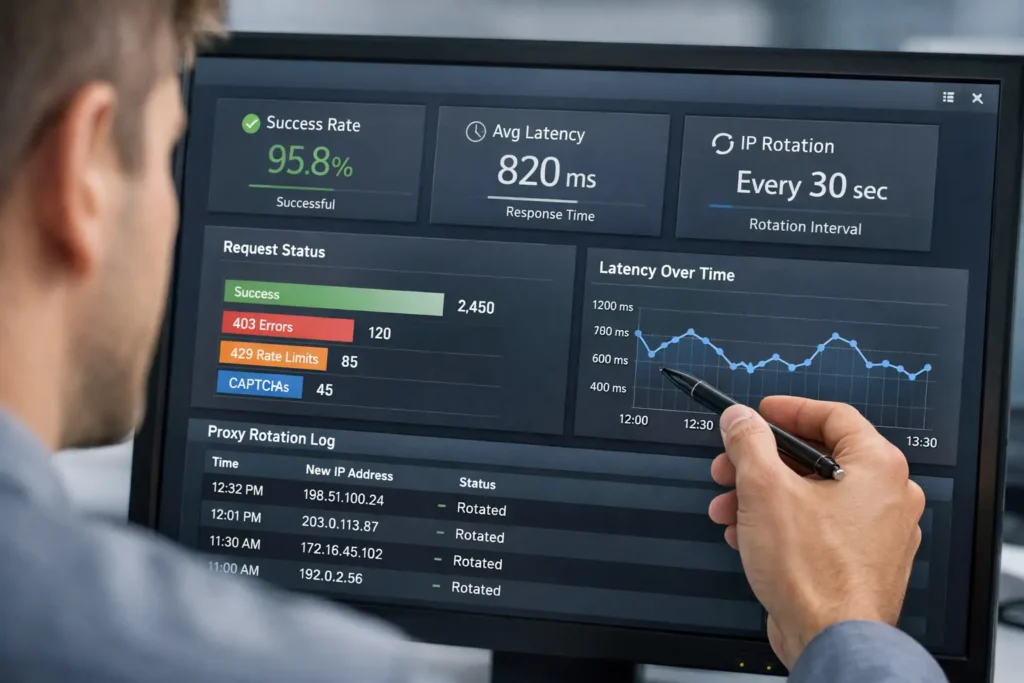
If your web data collection pipeline is returning 403s before the first rotation cycle finishes, the problem is rarely your scraper.
It’s the proxy layer, and more specifically, whether the proxies you’re using are matched to the targets you’re actually hitting.
This guide covers how to choose and validate proxies for web data collection across three common use cases: public ecommerce monitoring, SEO and search result tracking, and automation checks.
It also covers what to measure before committing to a larger plan, when rotating datacenter proxies are genuinely sufficient, and when stricter targets call for residential proxies instead.
Picking the Right Proxy Type for Your Use Case
Table of Contents
ToggleNot all web data collection targets are equally difficult to access. A public ecommerce catalogue page is a very different environment from a search engine results page, and treating them the same way is one of the fastest routes to a broken pipeline.
Understanding the access difficulty of your targets is the first step in any sensible proxy selection process.
Public Ecommerce Data Collection
Public ecommerce sites, including product listings, pricing pages, and availability feeds, are generally accessible with datacenter proxies.
These sites are designed to handle large volumes of traffic, and as long as you’re hitting public-facing URLs at a sensible rate, rotating datacenter proxies will handle most ecommerce targets without incident.
The main thing to watch is rotation behaviour. If you’re sending too many requests from the same IP in a short window, you’ll start collecting 429s instead of data, and no proxy type will save you from a rate limit you’ve walked straight into.
A sensible rotation interval, combined with a pool large enough to spread your requests across, covers most public commerce targets without much drama.
SEO and Search Engine Monitoring
Search engines are a different story. Google, Bing, and their equivalents actively block datacenter IP ranges, and many do so by default.
If your use case involves monitoring search engine results pages or tracking keyword positions at scale, you’ll need residential proxies with ISP-assigned addresses to get consistent access.
Datacenter proxies can work for lighter checks, but block rates tend to be high, and you’ll spend more time debugging failed requests than collecting anything useful.
Automation Checks and Functional Testing
Using proxies for automation checks typically means simulating requests from specific geographic locations to verify that your site, app, or third-party integrations behave correctly for users in those regions.
The proxy requirements here are more relaxed than ecommerce or SEO use cases, since you’re usually hitting your own infrastructure rather than a hardened external target.
Datacenter proxies are adequate for most of this work. Their lower latency is a genuine advantage when you’re running high volumes of automated checks on a schedule.
Where it gets more complex is when your checks involve third-party services that run their own IP reputation checks, such as payment gateways, ad platforms, or identity verification providers.
In those cases, datacenter IPs may trigger false positives that don’t reflect real user experience. Residential proxies will give you a cleaner signal.
Matching the proxy type to what the check is actually validating, rather than defaulting to a single proxy type across all checks, is the more practical approach.
What to Measure Before You Scale Up
The most common mistake teams make when setting up web data collection is scaling up a plan before they’ve validated that the proxy type and rotation behaviour actually work for their targets.
There are plenty of web data solutions on the market, but no proxy plan performs the same way across all targets. Assumptions made at the evaluation stage tend to become expensive problems at scale.
KocerRoxy’s one-day datacenter plan exists specifically for this. Run your actual collection jobs, measure what matters, and decide on a larger plan with real data rather than benchmarks.
Success Rate
The first thing to measure is the raw success rate on your actual target URLs. If you’re seeing more than a small percentage of blocks, 429s, or CAPTCHAs on a basic ecommerce target, that’s a signal to adjust your request rate or review your headers before concluding the proxies are the problem.
Most ecommerce block responses are rate-related, not IP-related. Fixing the rate behaviour first will save you from switching proxy types unnecessarily and keep your web data capture process running cleanly from the start.
Rotation Behaviour
Rotation behaviour matters more than pool size for most web data collection workflows. What you want to know is how frequently the proxy rotates, whether it rotates per request or per session, and whether that rotation stays consistent throughout the day or degrades under load.
Testing across different times of day will surface any performance variance that won’t show up in a short burst test.
This is exactly what the one-day plan is useful for: real-world rotation data collected over a full cycle, not a five-minute synthetic benchmark.
Latency and Throughput
Latency affects how long your collection jobs take to run. Throughput determines how much data you can pull within a given window.
Both should be measured against your actual target sites using your actual web data extraction tool, not synthetic checks run in isolation.
A proxy that performs well in a ping test may still introduce meaningful delays when it’s handling real HTTP requests at volume. That gap is only visible when you test against the real target under realistic load.
Datacenter vs Residential Proxies: When Does Each Make Sense?
When Datacenter Proxies Are the Right Call
Rotating datacenter proxies are the right choice when your targets are public ecommerce pages, B2B directories, news sites, or other content that isn’t sitting behind a heavy anti-bot layer.
They’re faster, cheaper, and easier to manage than residential alternatives. This makes them the sensible starting point for most web data collection pipelines.
For teams running high-volume requests against predictable targets, datacenter proxies will usually deliver better throughput at lower cost per request.
If you need parallel workers hitting the same target at scale, the speed advantage of datacenter proxies is worth more than the IP diversity that residential proxies offer.
KocerRoxy’s rotating datacenter plans include US-based IPs. The smallest plan is available on a one-day basis. So you can test real rotation behaviour and success rates against your targets before committing to anything larger.
When Residential Proxies Are the Better Fit
Residential proxies carry IP addresses assigned by real ISPs to real devices. That makes them significantly harder to block on IP reputation alone. This is why they’re the better fit for search engines, social platforms, and ecommerce sites running more aggressive bot detection.
If you’re seeing consistent CAPTCHA responses or soft blocks on datacenter proxies, the target is likely running IP reputation checks, and you’ll need residential addresses to get clean access.
Web data collection methods that involve mimicking organic browsing behaviour, including gradual scroll patterns, randomised timing, and session persistence, benefit most from residential proxies because the underlying IP is consistent with the behaviour pattern being simulated.
Important Considerations Before You Start
IP Reputation and Header Hygiene
Proxy type is only one part of getting clean access. Your request headers, including User-Agent strings, Accept-Language values, and Referer fields, are read alongside your IP address by most anti-bot systems.
A residential IP sending headers that look like a headless browser will still get flagged. The mismatch between the IP origin and the request fingerprint is itself a signal.
Getting your headers right means using realistic browser profiles that match the context of your requests, rotating them in line with your IP rotation, and avoiding obvious tells like missing Accept-Encoding headers or outdated User-Agent strings.
This is a step that a lot of teams skip when they’re first setting up online data collection methods. Also, it’s one of the most common reasons a working proxy setup still produces inconsistent results.
Terms of Service and Public Data
Web data collection from public pages is legally distinct from accessing authenticated or private data.
The data being collected here is publicly visible to any browser that loads the page. But sites may still prohibit automated access in their terms of service.
It’s worth reviewing the terms of your target sites and ensuring your collection methods are limited to publicly accessible content.
The legalities around web scraping of public data have generally trended in favour of collection. But terms of service restrictions are a separate matter from legality, and acting within them is the cleaner approach.
If you’re unsure about the boundaries for a specific target, consulting with a legal professional familiar with data law in your region is the sensible move.
Rate Limiting Is Your Responsibility
No proxy service controls how fast you send requests. Rate limiting is a client-side responsibility. The most common cause of collection failures is the request rates that are too aggressive for the target to tolerate.
Building in sensible delays, jitter, and retry logic with backoff is part of any reliable web data collection setup. It’s also the part that tends to get skipped when teams are moving fast.
A well-configured web data connector handles failure states gracefully, retries with exponential backoff, and doesn’t hammer a target after receiving a 429.
That behaviour is worth building into your pipeline from the start. Retrofitting it into a system that’s already in production is considerably less pleasant.
Getting these fundamentals right before you scale is what separates a collection pipeline that runs reliably from one that requires constant firefighting.
Get Your Web Data Collection Pipeline Working Properly
Choosing the right proxy for web data collection requires matching the proxy type to the target, validating performance before scaling, and having a clear picture of what your automation setup actually needs.
If you’re evaluating proxies for ecommerce data collection, SEO monitoring, or automation checks, KocerRoxy offers rotating datacenter and residential proxies with 24/7 support.
You can start with a one-day datacenter plan to test rotation behaviour and success rates against your actual targets. Then move to a larger plan once you’ve confirmed it meets your needs.
Get in touch with the team to find out which plan fits your use case.
FAQs About Proxies for Web Data Collection
Q1. What is web data collection?
Web data collection is the process of gathering structured or unstructured information from publicly accessible websites using automated tools or scripts.
It’s used across ecommerce, SEO monitoring, market research, and automation testing to extract product data, pricing, search rankings, and other publicly available content at scale.
The process typically involves HTTP requests, HTML parsing, and some form of data storage or downstream pipeline management.
Q2. What is web data?
Web data is any information that exists on publicly accessible web pages. This includes product listings, pricing, text content, metadata, and structured data formats like JSON or XML embedded in page responses.
It’s distinct from proprietary or internal data in that it’s available to anyone who can load the page. Though the method and volume of collection may be subject to the target site’s terms of service.
Q3. Why is data collection important?
Data collection is important because decisions made without data are, at best, educated guesses. For ecommerce teams, web data collection supports real-time pricing intelligence and competitor monitoring.
SEO teams get the raw material for tracking search rankings and content performance. For automation testing engineers, it supports quality assurance processes that catch issues before they reach production. Reliable, consistent data collection is what separates informed decisions from reactive ones.
How useful was this post?
Click on a star to rate it!
Average rating 0 / 5. Vote count: 0
No votes so far! Be the first to rate this post.
Tell Us More!
Let us improve this post!
Tell us how we can improve this post?